A free configuration library for GitHub Copilot and Claude Code.
Seven agents. Twenty-three skills. One zip file.
Subscribe to our newsletter and get the Agents and Skills library for free
Subscribe to our free newsletter and receive the files right away!
Plus, you will regularly receive free tips and insights into everything related to BI, data and AI.
No Spam!
VS Code + Copilot
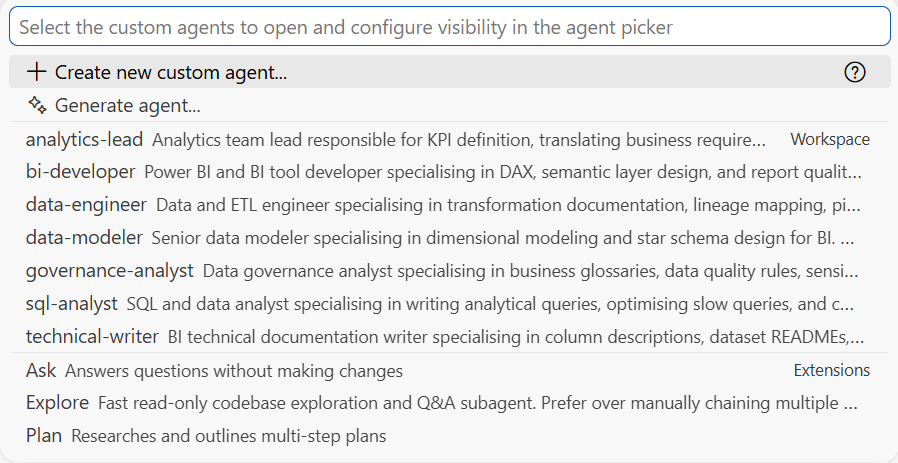
Agents in chat dropdown
Claude Code
Auto detected from .claude folder
One folder, for both tools
Same .claude folder, no duplication
What is an agent?
An agent is a role your AI steps into
Most people use AI assistants without any role context. The tool does not know whether it is helping a data engineer design a pipeline or a governance analyst draft a policy. It applies generic judgment to domain-specific problems.
An agent changes that. It is a configuration file that gives the AI a defined role, a scope, and a set of relevant capabilities before the first message is sent.
When you select the Data Modeler agent, the AI knows it is working on dimensional schema design. It knows what to focus on, what to clarify up front, and what to hand off to another role. You switch agents the way you would assign a task to the right person on the team.
What is a skill?
A skill is a workflow your AI knows how to run
Seven roles ready to use
Data Modeler
5 Skills
BI Developer
3 Skills
Governance Analyst
3 Skills
Data Engineer
3 Skills
Analytics Lead
3 Skills
SQL / Data Analyst
3 Skills
Technical Writer
3 Skills
Three steps to get started
What exactly is in the ZIP?
The library is a folder of plain Markdown files. There is no executable code, no installation script, and no dependency to manage.
Each agent is a single .md file with a short configuration header and a set of role instructions. Each skill is a folder containing a SKILL.md file with a structured workflow.
You can open every file in a text editor, read it, and change it. If your organisation uses different naming conventions, different database dialects, or specific business rules, you edit the relevant file and the AI follows the updated instructions.
The files follow an open standard (agentskills.io) and are compatible with any tool that implements it.
Subscribe to our newsletter and get the Agents and Skills library for free
Subscribe to our free newsletter and receive the files right away!
Plus, you will regularly receive free tips and insights into everything related to BI, data and AI.
No Spam!