DATA MODELING WITH AI

How To Design A Star Schema With ChatGPT (Step-By-Step)

A star schema is the table structure that makes a Power BI or Microsoft Fabric semantic model fast, filterable, and easy to understand. Star schema design with ChatGPT can shortcut a lot of the drafting work, but it cannot decide your grain or validate itself against your real data. That part is still your job.

Key Takeaways

  • A star schema has exactly two table types: fact tables (events and measures) and dimension tables (descriptive attributes).
  • ChatGPT is useful for drafting candidate tables, keys, and SQL, but not for deciding your fact table’s grain, which requires business context it doesn’t have.
  • Always validate AI-suggested models against source data cardinality and stated business rules before you build anything in Power BI or Fabric.

Who This Is For

BI analysts, data modelers, and Power BI or Microsoft Fabric developers who already understand the basics of dimensional modeling and want a faster, AI-assisted way to get from source tables to a working star schema.

What Is A Star Schema?

A star schema is a mature, widely adopted dimensional modeling approach that classifies every table in a semantic model as either a dimension table or a fact table, according to Microsoft’s Power BI modeling guidance.

  • Dimension tables describe business entities: products, customers, dates, locations. They hold a key column plus descriptive attributes used for filtering and grouping, and they’re usually small and slow-changing.
  • Fact tables store observations or events: sales orders, sign-ups, shipments. They hold dimension key columns plus numeric measure columns, and they’re usually large and constantly growing.

The relationship between the two is what makes reporting fast: dimension tables filter and group, fact tables summarize. In Power BI and Fabric specifically, a one-to-many relationship determines which side is which. The “one” side is always the dimension, the “many” side is always the fact table. Ralph Kimball formalized this approach in The Data Warehouse Toolkit (3rd edition, 2013), and it’s still the reference most data warehouse and semantic-model guidance points back to today.
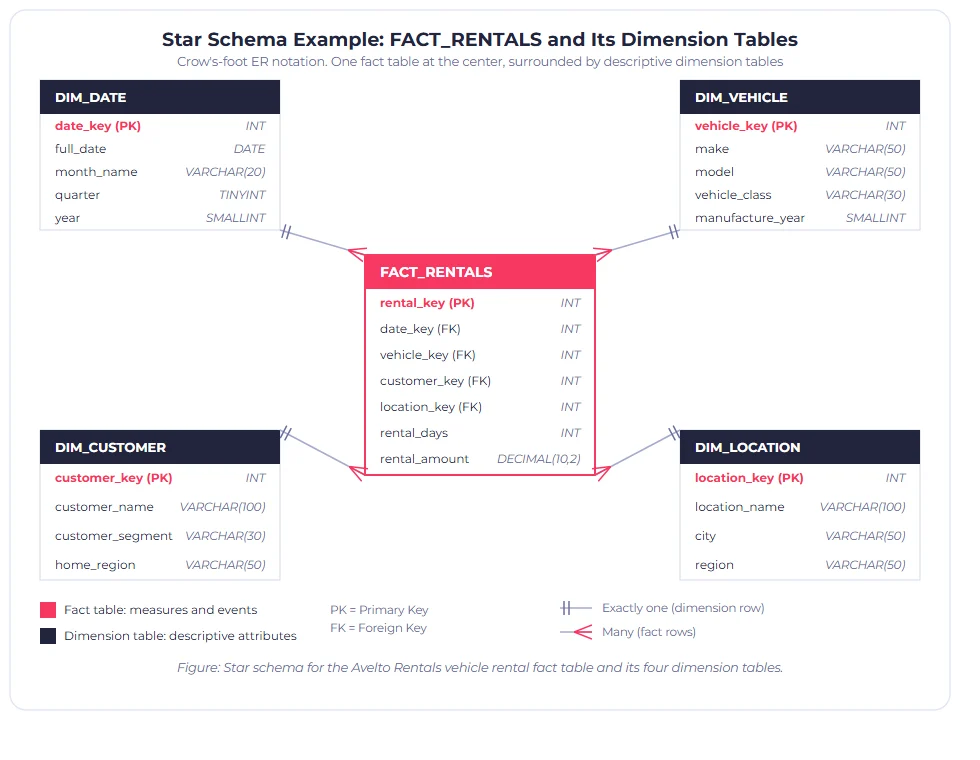
Star schema diagram in crow's-foot ER notation showing FACT_RENTALS connected to DIM_DATE, DIM_VEHICLE, DIM_CUSTOMER, and DIM_LOCATION with column data types

Figure 1: A star schema for a vehicle rental fact table. The fact table (coral) holds foreign keys and measures; each dimension table (navy) holds descriptive attributes and connects with a one-to-many relationship in crow’s-foot notation.

Why Use ChatGPT For Star Schema Design At All?

Because the slow part of dimensional modeling usually isn’t the concepts. It’s the drafting. Naming conventions, candidate key lists, first-pass SQL for a dimension table, a checklist of slowly changing dimension scenarios to consider: all of that is exactly the kind of repetitive, well-documented work a large language model can accelerate.

What ChatGPT cannot do is know your business. It cannot tell you that your “Order” table actually mixes two different grains, because it has never seen your source system. It will answer a modeling question fluently whether or not it actually understands your data, which is exactly why every AI-assisted model needs a human validation step before it reaches production.

The 7-Step Workflow For Star Schema Design With ChatGPT

Before asking ChatGPT anything, write two or three sentences describing the business process you’re modeling. For example, “We rent vehicles to customers. Each rental has a start date, return date, vehicle, customer, and rental location.” ChatGPT’s dimension and fact suggestions are only as good as this description.
Give it your process description and your raw source table and column list, and ask it to classify each table or column as a likely fact, dimension, or attribute. Treat the output as a first draft, not a final answer.
Grain, what a single row in the fact table represents, is the one decision ChatGPT should not make for you. The granularity of a fact table is determined by the dimension key values you choose to store, not just the dimension keys present. Get this wrong and every measure built on top of it will be wrong too.
With the grain fixed, ask for a dimension table structure: surrogate key, business key, and descriptive attributes. Explicitly ask it to flag any attribute that changes over time (a slowly changing dimension candidate) versus one that’s essentially static.
Ask for the fact table’s dimension key columns and measure columns, matched to the grain you defined in Step 3. Have it write the columns as a table, not prose. This is much faster to review and paste into a modeling tool.
Check row counts, cardinality, and null patterns in your real source tables against what ChatGPT assumed. This is the step most AI-assisted modeling shortcuts skip, and it’s the one that catches hallucinated relationships or invented columns.
Ask ChatGPT directly about slowly changing dimensions, role-playing dimensions (like a date table used for order date, ship date, and delivery date), junk dimensions, degenerate dimensions, and factless fact tables. These are the star schema patterns that get missed most often in a first pass.

Example Prompts You Can Copy

Goal Prompt
Classify tables “Here are my source tables and columns: [paste]. Classify each as a likely fact table, dimension table, or attribute, and explain your reasoning.”
Define grain “My fact table describes [business process]. Given these columns: [list], what is the most likely grain, and what would change the grain?”
Draft a dimension “Draft a dimension table for [entity] with a surrogate key, business key, and descriptive attributes. Flag any attribute likely to need slowly changing dimension handling.”
Draft a fact table “Draft a fact table at the grain of [grain]. List dimension key columns and measure columns as a table.”
Stress-test the model “What star schema mistakes are most likely in this design: [paste model]? Check for mixed grain, missing surrogate keys, and unhandled many-to-many relationships.”

Pro tip: Paste your actual column names and data types into every prompt. Generic prompts get generic, textbook answers. Specific inputs get specific, checkable ones.

Common Mistakes When Using ChatGPT For Data Modeling

  • Accepting a proposed grain without checking source data. ChatGPT will confidently pick a grain from your description alone; only your source data can confirm it’s correct.
  • Skipping surrogate keys. AI-drafted dimension tables sometimes reuse a business key as the only identifier, which breaks slowly changing dimension handling later.
  • Treating a snowflake suggestion as final. ChatGPT may propose normalized, snowflaked dimensions because that’s common in textbook examples. Power BI models are usually better served by a single denormalized dimension table.
  • Not asking about role-playing dimensions. A single date table used for order date, ship date, and delivery date is a common pattern ChatGPT won’t surface unless you ask about it directly.
  • Treating the first draft as production-ready. Every AI-assisted model needs the same review a human-drafted model would get: grain check, cardinality check, business-rule check.

Star Schema Validation Checklist

Use this after every AI-assisted draft, before you build anything in Power BI or Fabric.

  • Grain is written down as one sentence and matches actual source row granularity
  • Every dimension table has a surrogate key, not just a business key
  • Slowly changing dimension columns are identified (Type 1 vs Type 2) for each dimension
  • Fact table measure columns match the stated grain, with no mixed-grain columns
  • Role-playing dimensions are explicitly handled, not silently merged
  • Many-to-many relationships use a bridging (factless fact) table, not a direct relationship
  • Row counts and null rates in source tables have been spot-checked against the model’s assumptions

Frequently Asked Questions

ChatGPT can draft a strong first version of a star schema (candidate tables, keys, and SQL), but it cannot see your source data or confirm your grain. Treat its output as a reviewable draft, not a finished model.
A fact table stores measurable events (sales, sign-ups, rentals) plus the keys linking to dimensions. A dimension table stores descriptive attributes (product name, customer region, date) used to filter and group those facts.
Basic SQL knowledge helps you validate what ChatGPT proposes, but it’s not required to get a first draft. It becomes necessary once you move from draft tables to actually building and querying the model.
Grain is what a single row in your fact table represents. For example, “one row per rental per day.” Get the grain wrong and every measure built on the fact table inherits the error, which is why it’s the one decision you shouldn’t delegate to an AI tool.

Build The Judgment ChatGPT Can’t

Star schema design with ChatGPT works best as a partnership. Let the model draft candidate tables, keys, and SQL, but keep grain decisions, source-data validation, and edge-case handling in human hands. The Data Modeling in the Age of AI course covers exactly this workflow in depth, and it’s also the subject of Chapter 3 in Business Intelligence in the Age of AI, using the book’s running Avelto Rentals case study.

Related Free BI Resources

Not ready to enroll yet? Start with these free BI Academy resources.

Keep your BI skills sharp – follow for more insights!

Leave A Comment